
In 2026, self-custody remains the gold standard for protecting your crypto assets amid rising threats from sophisticated hackers and phishing schemes. As a portfolio manager who's guided clients through multiple market cycles, I always stress choosing the right wallet as your first line of defense. Today, we're diving into Ledger vs MetaMask, pitting hardware against software in this hardware vs software wallet 2026 showdown to help you secure true ownership of your digital wealth.
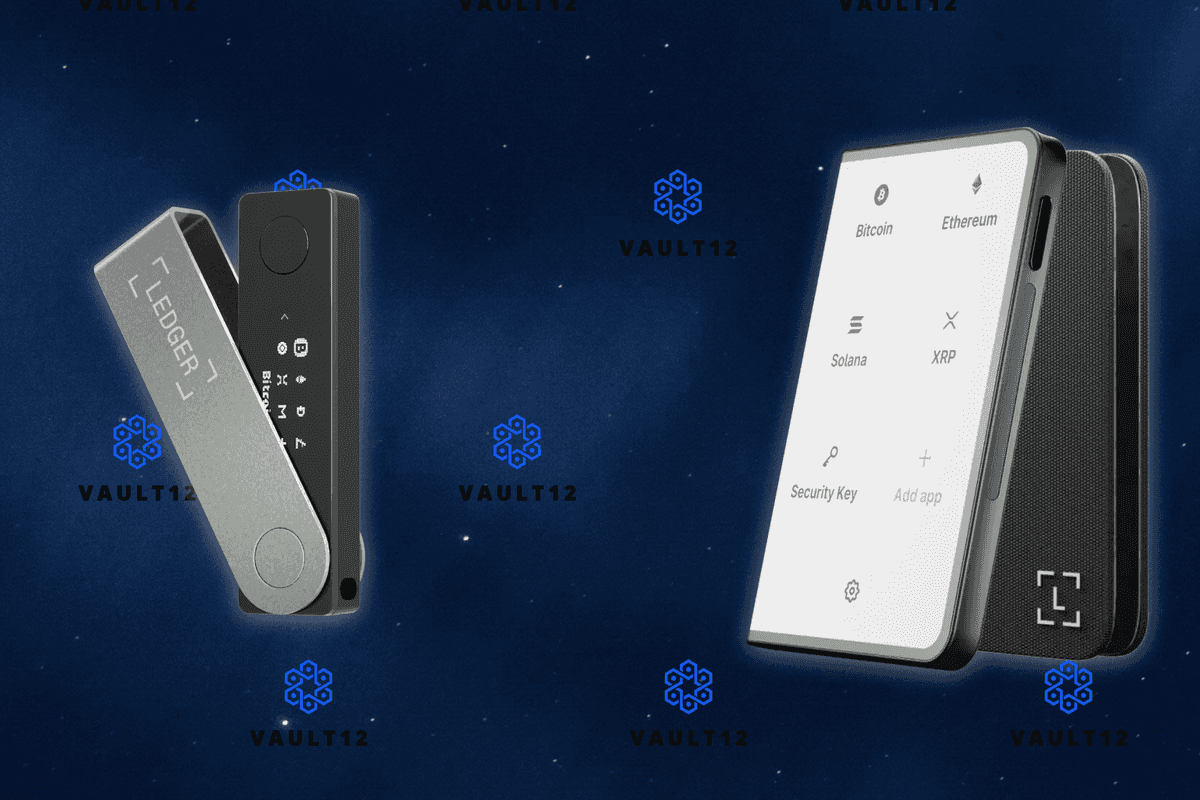
Ledger stands out as the premier hardware wallet, engineered for those who prioritize unbreachable security. Devices like the Ledger Nano X and Nano S Plus house your private keys in a certified Secure Element chip, completely isolated from the internet. This offline, or cold, storage means even if your computer harbors malware, your funds stay safe. Ledger's BOLOS operating system further fortifies this by sandboxing apps and demanding physical button confirmation for every transaction. No wonder it's hailed in reviews for its secure-element and offline key storage and self-custody architecture.
Ledger's Ironclad Defenses in a Connected World
What sets Ledger apart is its resilience against the most common attack vectors. Phishing? Forget it; you verify every detail on the device's screen. Malware? Irrelevant, since keys never leave the chip. In fact, Ledger's integration with MetaMask via Bluetooth or USB bridges the gap, letting you enjoy dApp interactions without exposing keys. For long-term holders stacking Bitcoin or Ethereum, this is the best self custody wallet option, hands down. I've recommended it to clients managing portfolios exceeding seven figures, and it never disappoints.
MetaMask's Strengths and Vulnerabilities Exposed
MetaMask, the ubiquitous browser extension and mobile app, shines for everyday Web3 warriors. It connects seamlessly to Ethereum and EVM chains, enabling swaps, NFT mints, and DeFi yields with a few clicks. But here's the trade-off: as a hot wallet, your private keys reside on your connected device, making it prime bait for clipboard hijackers, fake extensions, and keyloggers. Recent reports highlight ongoing challenges with phishing scams targeting MetaMask users. While convenient for small, frequent transactions, it's not ideal for your entire nest egg. In my MetaMask security review, convenience scores high, but fortification needs bolstering.
That said, MetaMask isn't defenseless. Features like hardware wallet support mitigate risks, and its open-source code invites community audits. For active traders dipping into dApps daily, it's indispensable, especially with 2026 updates enhancing mobile Bluetooth pairing with Ledger Nano X.
Security Features Comparison: Ledger vs MetaMask
| Feature | Ledger | MetaMask |
|---|---|---|
| Offline Private Key Storage | 🔒 Yes (Secure Element Chip) | ❌ No (Internet-Connected Device) |
| Protection Against Online Threats | ✅ Robust (Offline Keys) | ⚠️ Susceptible (Phishing & Malware) |
| Phishing Resistance | 🔒 High (On-Device Confirmation) | ⚠️ Low (Fake Extensions & Clipboard Hijackers) |
| Malware Protection | 🔒 High (Keys Inaccessible) | ❌ Vulnerable (Keyloggers) |
| Transaction Confirmation | 🔐 Physical On-Device | 💻 Software-Based |
| Secure Operating System | ✅ BOLOS (App Isolation) | N/A (Browser Extension) |
| dApp Integration | ✅ Via MetaMask/Bluetooth | ✅ Native (Hot Wallet Convenience) |
| Best For Large Holdings | 🔒 Recommended | ⚠️ Pair with Hardware Wallet |
Core Security Pillars: Where Ledger Outshines MetaMask
Let's break down the essentials. Private key generation happens on-device for Ledger, ensuring seed phrases are yours alone from the start. MetaMask generates keys locally but stores them encrypted on your machine, vulnerable to ransomware. Transaction signing? Ledger requires tactile approval, slashing blind-signing errors that plague software setups. Recovery options favor Ledger too, with its 24-word seed and optional passphrase for hidden accounts.
Quantitatively, hardware wallets like Ledger report near-zero breaches when used correctly, versus software incidents numbering in the thousands annually. Pair this with Ledger Live's firmware updates and recovery check tools, and you have a system built for endurance. MetaMask counters with multisig and social recovery experiments, but these add complexity without matching cold storage purity.
Yet for the average user juggling DeFi protocols and NFT drops, Ledger's edge lies in its simplicity paired with power. Think of it as your vault: impenetrable until you say so. MetaMask, while evolving with MPC experiments and better recovery phrases, still demands vigilance that many overlook in the heat of a bull run.
Seamless Integration: The Best of Both Worlds in 2026
Here's where things get exciting. MetaMask's Bluetooth support for Ledger Nano X transforms your setup into a hybrid powerhouse. You browse dApps through MetaMask's intuitive interface, but every transaction pops up on Ledger for your eyes-only approval. No more blind signing that has drained millions from software-only users. This combo leverages MetaMask's Web3 prowess with Ledger's fortress-like security, ideal for active portfolios. In my practice, clients using this integration report zero incidents, even during phishing spikes targeting hot wallets.
Pros and Cons Comparison - Ledger vs MetaMask (2026 Focus: Cost, Usability, Features)
| Wallet | Pros | Cons |
|---|---|---|
| Ledger | • 🔒 Offline private keys in Secure Element chip (BOLOS OS) • ✅ Manual on-device transaction confirmation • 🛡️ Robust against malware, phishing, online threats • 📱 Bluetooth integration with MetaMask Mobile (Nano X) • 💰 One-time hardware purchase for long-term security | |
| MetaMask | • 💸 Completely free software wallet • 🚀 Seamless usability for dApps, daily Web3 transactions • 📱 Mobile app with Bluetooth Ledger support • ⚡ Quick setup and frequent use convenience • 🔗 Easy integration with hardware like Ledger | |
| Ledger | • 💸 Upfront cost for device (~$79-$149 typical) • 📉 Less convenient for high-frequency small transactions • ⚠️ Physical loss/damage risk (requires seed backup) • ⏳ Setup and confirmation slower for daily use | |
| MetaMask | • 🌐 Private keys on connected devices (phishing/malware risk) • ❌ Vulnerable to fake extensions, clipboard hijackers • 🔓 No inherent offline protection • ⚠️ Higher exposure for large holdings without hardware |
Cost enters the equation too. Ledger devices start around $79 for Nano S Plus, a one-time fee dwarfed by potential losses. MetaMask remains free, but factor in the hardware upgrade for true safety. Both support thousands of assets, though Ledger Live expands to Bitcoin, Solana, and beyond without browser dependency.
Real-World Scenarios: Matching Wallets to Your Strategy
For HODLers with significant stakes, Ledger solo reigns supreme. Park your Bitcoin or Ethereum offline, check balances via Ledger Live, and sleep soundly. Day traders? MetaMask with Ledger backend keeps you nimble yet secure. NFT enthusiasts benefit from Ledger's app isolation, preventing one rogue contract from wiping your collection. Businesses eyeing European compliance lean toward Ledger's audited Secure Element over MetaMask's extension risks, as noted in fintech comparisons.
Ledger's proprietary BOLOS isolates apps, ensuring one compromised dApp doesn't touch your keys. MetaMask relies on your device's integrity, a gamble in 2026's malware jungle.
Recovery deserves a spotlight. Lose your Ledger? Your 24-word seed restores everything on a new device. MetaMask offers seed backups too, but exposing them online for cloud sync invites trouble. Ledger's passphrase adds plausible deniability, a ninja-level feature for paranoid pros like me.


Looking ahead, 2026 trends favor hardware. With embedded wallets rising via MPC, Ledger adapts by partnering for seamless on-ramps. MetaMask pushes Snaps for custom security, but nothing beats air-gapped keys for self-custody purists. My verdict? If your stack tops five figures, default to Ledger. For pocket change and experimentation, MetaMask suffices, upgraded with hardware.
Ultimately, self-custody thrives on matching tools to threats. Ledger fortifies your foundation, MetaMask fuels your flexibility. Diversify your defenses: start with hardware, layer on software wisely. Your portfolio's resilience depends on it.



No comments yet. Be the first to share your thoughts!